Online voting for professional associations can support many different voting needs throughout the year, from leadership elections and bylaw changes to chapter decisions and other member votes. In 2020, as the National Organization of Black Law Enforcement Executives (NOBLE) prepared for a virtual annual conference during the COVID-19 pandemic, the organization began using Simply Voting to conduct online voting for its members.
NOBLE is a national membership organization with more than 4,800 members and 58 chapters across six regions, focused on public safety and equity in the administration of justice. Since then, NOBLE has conducted 48 elections through the online voting platform, with electorates ranging from small groups to approximately 3,300 members. Its use spans national, regional, and chapter voting, including officer and board elections, representative elections, runoffs, bylaw and constitutional votes, and chapter recognition programs.
Requirements & Challenges
NOBLE needed an online voting system flexible enough to accommodate recurring elections and member decisions with varying electorates, ballot configurations, and governance requirements.
NOBLE also needed flexibility in how its elections were administered. Early on, it opted for Simply Voting’s Fully Managed professional services before later transitioning to self-service administration.
Key requirements included:
An online voting system NOBLE could use on a self-service basis for recurring national, regional, and chapter elections.
Flexible ballots for candidate elections with write-in functionality, as well as other configurable ballot formats for bylaw and constitutional proposals and member decisions.
Support for both small voting groups and organization-wide elections involving thousands of members.
Familiar voter authentication and a branded online voting experience for members.
Simply Voting’s Online Voting System
Self-Service Election Management: After having a couple of its early elections fully managed through Simply Voting’s Professional Services, NOBLE transitioned to using the online voting system on a self-service basis, with elections administered through its national office. For recurring votes, NOBLE clones and adapts previous elections, reducing the setup required for each new vote.
Different Types of Elections and Member Votes: NOBLE uses Simply Voting for national officer and board elections, regional and chapter elections, member-representative elections, runoffs, bylaw and constitutional votes, and chapter recognition programs. Officer elections can include nominated candidates alongside write-in options. For bylaw and constitutional votes, supporting documents are linked from individual proposals so members can review the proposed changes before voting to approve, disapprove, or abstain.
Familiar Member Experience: NOBLE uses existing Membership IDs for voter authentication. Its voting website within the Simply Voting online voting system incorporates NOBLE branding, providing members with a recognizable voting environment. Eligible voters receive email invitations and reminders with instructions on how to access online voting.
The Results
What began with online voting during NOBLE’s virtual conference in 2020 has become a recurring part of its governance and member voting. NOBLE has now conducted 48 elections through Simply Voting.
Participation has also increased in NOBLE’s comparable recurring National Officer, Board and Bylaws election. Turnout grew from 34.4% in 2020 to 43.6% in 2026, an increase of 9.2 percentage points.
Looking for an online voting system for your professional association? Simply Voting helps professional associations manage recurring elections and member decisions of many kinds, from officer and board elections to bylaw votes, chapter elections, runoffs, and other governance needs. Whether your organization wants to administer elections using the online voting system on a self-service basis or receive assistance through Simply Voting’s professional services, contact us today to discuss your upcoming election.
Choosing an online voting system provider is a consequential decision. In most cases, that responsibility will fall to one person or a small group balancing election planning with many other responsibilities. They may know security is important, but it is not always obvious how to evaluate the security practices behind an online voting provider’s claims.
You can make better decisions by looking for credible proxies and asking a small number of revealing questions. These signals can tell you a great deal about how seriously an online voting provider approaches security and how much evidence sits behind its claims.
Security is only one part of choosing an online voting system provider. We have a separate guide to choosing an online voting provider that looks at the broader decision, including election requirements, administration, support, and reporting. Here, we are going deeper on security.
Look for Independent Security Assurance
If you do only one thing to evaluate an online voting provider’s security, start by looking for credible independent security assurance.
You aren’t in a position to evaluate every part of an online voting provider’s security program yourself, and that is okay. Independent third-party scrutiny gives you another source of evidence. A security-conscious online voting provider should already be engaging qualified third parties to examine important parts of its practices and technology. As a buyer, you can use that work instead of relying only on the company’s own claims.
Independent security reviews can take different forms. Specialized auditors may examine whether a company has appropriate security controls and processes in place, such as how access is managed, risks are assessed, incidents are handled, or business continuity is planned. Other security specialists focus more directly on the technology, such as examining source code for potential weaknesses or actively testing a system to see whether vulnerabilities can be found and exploited.
These reviews answer different questions, so it is useful to understand what was actually examined. The organization behind the review matters too. Look for an established auditor or security firm with a meaningful track record, ideally one that regularly performs similar work for other established organizations.
Simply Voting recently completed its 2026 SOC 2 examination with A-LIGN, an established cybersecurity compliance firm that reports having completed more than 36,000 audits for more than 6,400 clients globally. Simply Voting’s examination covered controls relevant to Security, Availability, and Confidentiality for its Online Voting and Internet Elections Services System.
Look at How the Online Voting Provider Approaches Security
Much of what you initially learn about an online voting provider will come from its website, proposals, and conversations with its team. Independent assurance is valuable because it can corroborate parts of that story rather than leaving every security claim self-reported.
It is also useful to understand who within the online voting provider is responsible for security and what resources support that work. Does the company maintain an in-house technical team that understands, maintains, and secures the platform, or are core technical responsibilities primarily outsourced? Outside specialists can provide valuable expertise, particularly for independent testing and other specialized security work, but the online voting provider itself should have clear ownership of its security and the technical capability to respond when something needs attention.
A mature security program involves much more than the technology itself. Staff security training, access management, risk assessment, vendor oversight, monitoring, vulnerability management, incident planning, and business continuity can all play a role.
A SOC 2 report can be particularly valuable here because it provides independent insight into many of these underlying practices. Simply Voting’s 2026 report, for example, covers controls across risk assessment, staff security training, access management, vendor oversight, monitoring, vulnerability management, business continuity, and other areas.
Price and company size are poor substitutes for evidence of how security is actually managed. A more useful baseline is understanding who owns security, what people and processes support that work, and what independent evidence supports the company’s description of its security program.
Security Starts Before Problems Are Found
Look for depth and multiple layers of prevention, review, and testing. No single test or security practice can identify every possible weakness. Using different approaches gives an online voting provider more opportunities to prevent problems and find those that do occur.
It starts with how the software itself is developed and maintained. Changes to an online voting system should be reviewed and tested before they reach customers, and the software and supporting systems need to be maintained as technology and security threats evolve.
Simply Voting follows a documented software development life cycle (SDLC) in which software changes are peer reviewed and tested before they reach production, with those change-management controls included in its 2026 SOC 2 examination.
Security testing can then examine the system from different perspectives.
Source-code scanning looks within the software itself for programming patterns or mistakes that could create security weaknesses. You can think of it as examining the application from the inside.
Vulnerability scanning checks the systems and software being used for known security weaknesses. Because new vulnerabilities are continually discovered in widely used technologies, this type of scanning can be performed frequently.
Independent penetration testing approaches security from another direction. Security specialists actively test the system and attempt to find and exploit weaknesses much as an attacker might. This can uncover issues that may not be apparent through development processes or automated scanning alone.
Simply Voting also conducts annual independent penetration testing, daily vulnerability scanning, and regular source-code scanning.
A vigilant security program also welcomes legitimate opportunities to find issues that those layers of testing may have missed. Outside security researchers can provide another valuable source of scrutiny, and a vulnerability disclosure program gives them a clear way to report a potential weakness so it can be investigated and addressed. Simply Voting maintains a formal vulnerability disclosure program because ongoing vigilance is important.
Ask how the online voting provider works to prevent security weaknesses, what different methods it uses to find them, and what happens when one is identified.
Understand How Voter and Election Data Is Handled
Look for a clear explanation of how customer information is handled from beginning to end. An online voting provider should be able to explain that lifecycle in terms you can understand.
An online election will require voter personally identifiable information (PII), participation data, election results, and other customer information. Where is it stored? Who can access it? How is access controlled? How is information protected while it is transmitted and stored? How long is it retained? What happens when it is no longer needed?
Election-specific protections matter as well. Voter authentication needs to support the requirements of the election, while ballot secrecy and confidentiality need to be maintained where required. Administrative access should also be controlled so that only authorized people can manage sensitive election information or settings.
It is also reasonable to ask which other companies are involved in storing, processing, backing up, or transmitting your information. An online voting provider may rely on hosting companies, backup services, communications providers, or other vendors. Part of managing security is knowing those dependencies, limiting access appropriately, and assessing the risks that come with them.
At minimum, you should be able to get clear answers about what customer information the online voting provider holds, who can access it, how it is protected, where else it may go, how long it is retained, and what happens when it is no longer required.
Security Includes Reliability and Availability
Look at how the online voting provider tests capacity, builds in resilience, and prepares for failures. Voters need to be able to cast their ballots, and customer administrators need to be able to access and manage their elections when the system is needed.
Online voting platforms support hundreds of elections at the same time. Load testing needs to consider demand across the platform as a whole, not just any one election.
Load testing places very heavy simulated demand on the platform to see how the online voting system performs under pressure and to help determine how much capacity should be available. Simply Voting regularly performs load testing to make sure the platform has far more capacity than it would normally require across all active customers, leaving ample room for spikes in usage.
Reliability also depends on the infrastructure underneath the application and what happens when something fails. Simply Voting uses established infrastructure providers, including Hut 8 for production hosting and AWS for offsite backups. This is supported by Simply Voting’s own monitoring, redundancy, backup practices, and tested business continuity and disaster recovery planning.
A useful check is how the online voting provider tests overall system capacity, what resilience exists in its underlying infrastructure, and how regularly its continuity and recovery plans are tested.
5 Security Questions to Ask an Online Voting System Provider
A detailed technical security review is not realistic for every organization, but a small number of practical questions can still reveal a great deal about the security practices behind an online voting system:
What independent security audits or assessments do you undergo, who performs them, and what do they cover?
Who is responsible for security, and what technical team and resources support that work?
What ongoing practices do you use to prevent, identify, and address security weaknesses?
How is customer, voter, and election data protected, who can access it, where else may it go, and how long is it retained?
How do you test the online voting system for heavy demand, prepare for failures, and verify that the service can remain available or recover as planned?
Any online voting provider worth your business should be able to answer these questions and back up its claims with evidence.
Making a More Informed Security Decision
There is no single audit, test, feature, or policy that tells you everything you need to know about the security of an online voting system provider. A sound evaluation comes from asking good questions, looking for credible evidence, and understanding what sits behind the word “secure.”
Simply Voting’s broader security approach includes its 2026 SOC 2 examination, staff security training, a documented software development life cycle, annual independent penetration testing, ongoing vulnerability testing, a vulnerability disclosure program, load testing, and tested business continuity and disaster recovery planning.
Evaluating an Online Voting System Provider? Simply Voting has been helping organizations run secure online elections since 2003, supported by an ongoing program of independent review, security testing, load testing, and continuity planning. Contact us today to discuss your upcoming election and the security requirements that matter to your organization.
Professional associations rely on member participation to select leaders and make certain governance decisions. However, the election itself is often managed by one person or a small team balancing election administration with membership, communications, and other responsibilities.
Some association elections are relatively straightforward, such as an annual vote for a handful of leadership positions. Others involve multiple positions, different voter groups, or member votes on bylaws, dues, and other governance matters.
An online voting tool needs to reflect those rules without making the election unnecessarily difficult to administer. Eligible members should have a clear voting experience, and the association should be able to confidently stand behind the result.
Different Approaches to Leadership Selection
Leadership selection begins before the ballot opens. The process may include candidate recruitment, nominations, eligibility review, and preparation of candidate information before members are asked to vote.
The way associations select their leaders can also vary considerably, and some of those approaches are evolving. ASAE, the American Society of Association Executives, has highlighted a growing emphasis in some organizations on board competencies rather than strictly geographic or constituency-based representation. It has also identified interest in smaller, more diverse boards and, in some cases, the use of a single slate rather than a traditional contested election.
In practice, that can lead to very different online voting processes. Members might choose between candidates for a single position, select several people from a larger field, approve a proposed slate, or elect a representative for a particular group or region.
Voting Rights and Eligibility Can Vary
Professional associations may have membership categories with different voting rights. Eligibility may depend on membership type, good standing, professional designation, or other requirements established in the association’s governing documents.
Before online voting opens, administrators need to translate those rules into an accurate voter list. That can mean confirming membership status, identifying the appropriate voter groups, removing ineligible records, and making sure the contact information being used for the election is current.
Some associations also have additional layers that affect voting eligibility or ballot access. Chapters, regions, professional sections, or specialty groups may have their own elected positions or voting rights. An organization might elect national leaders alongside regional representatives, conduct separate section elections, or have members who are eligible for several related voting events.
International associations may have further considerations, including multiple languages, geographically distributed members, and online voting periods that need to accommodate several time zones.
For an association with straightforward requirements, an online voting tool may only need one accurate voter list and one organization-wide ballot. When voting rights vary by membership category, region, section, or another rule, administrators may need more precise control over which voters receive access to particular positions or questions.
Eligibility is only one part of the association’s voting rules. Governing documents may also establish quorum requirements, approval thresholds, the number of candidates a member may select, or other conditions that affect how a particular election or member decision is conducted.
Together, these rules shape the online voting process, determining who can participate, what appears on each member’s ballot, and what is required for the result to count.
Election Administration Is Usually One Responsibility Among Many
The person responsible for an association election may use the online voting tool for a few weeks and then not return to it until the organization’s next voting cycle. Election administration is also likely to be only one part of a broader role that includes membership, communications, and other association responsibilities.
This reflects a broader reality of association management. CSAE, the Canadian Society of Association Executives, recognizes that internal capacity can vary widely between organizations, from associations with dedicated staff or departments to those where one individual may be the only staff resource.
This makes usability particularly important. An association’s election requirements may still be sophisticated, with different voter groups, ballot rules, or communication needs, but administering them should not require the person responsible for the vote to become a technical specialist.
Some associations will be comfortable administering their elections themselves. Others may prefer additional support or independent election management. The appropriate approach depends on the organization’s internal resources, governance requirements, and the role it wants an outside provider to play.
Leadership elections commonly follow an established cycle as directors, officers, or other elected representatives complete their terms. Although candidates, dates, and voter information change, much of the underlying election structure may remain familiar.
That familiarity can be useful for the person administering the election. Processes, ballot structures, and lessons from a previous voting cycle can provide a starting point rather than requiring everything to be reconsidered from the beginning each year.
Associations can also learn from one election to the next. Questions from members, communication issues, or parts of the process that required extra attention can inform the next voting cycle.
Not every leadership change follows the expected schedule, however. A resignation or other vacancy may require a replacement process or special election to fill the position. In those situations, the association may be working from a familiar election framework while adjusting the timeline, position, voter group, or other details for the circumstances.
The Member Voting Experience
The way members experience an election can shape their confidence in the process. A clear, well-organized ballot helps voters understand the decision before them, know how to participate, and feel confident in exercising their voice on association matters. For members, online voting can make participation simple and immediate.
Professional association ballots may therefore need to provide more context than a list of names or a simple yes-or-no question. Candidate elections can include biographies, professional qualifications, statements, photographs, and information about the position being filled. Governance votes may instead require proposed wording, background information, supporting documents, or an explanation of what would change if the proposal is approved.
The surrounding voting experience matters as well. Members need to know when voting opens and closes, how to access the ballot, and where to get assistance if they encounter a problem. This can be particularly important when an association is introducing online voting for the first time.
Selecting directors, officers, or other representatives is a common reason professional associations conduct a vote, but leadership elections are not the only decisions that may be placed before members.
Members may also vote on bylaw or constitutional amendments, member resolutions, governance changes, dues or fee proposals, and other matters requiring formal approval. ASAE has noted that member voting rights can extend beyond leadership elections to significant organizational decisions. It has also highlighted bylaw votes as an opportunity to help members better understand how their association is governed and why proposed changes matter.
These decisions give members a direct role in matters that can shape the organization beyond who serves in its leadership positions. Online voting provides a straightforward way for members to exercise those formal voting rights, whether they are choosing association leaders or having a voice on a governance question placed before the membership.
What Should a Professional Association Look for in an Online Voting Tool?
Ultimately, a professional association needs to confidently stand behind both the election process and the final result. That requires more than simply collecting ballots online.
When evaluating an online voting tool, key considerations include:
The association’s governance and voting rules. The system should accommodate the leadership selection methods, ballot formats, approval thresholds, and other requirements established by the association.
Accurate voter eligibility and authentication. Administrators need to control who can vote and, when necessary, which positions or questions particular members can access.
Ballot secrecy, privacy, and security. The system should protect member voting information and maintain the appropriate separation between voter participation and ballot choices.
A clear and accessible member experience. Members should be able to understand and access the ballot across common devices, with candidate or proposal information and language options where required.
Manageable administration. The system should provide the required flexibility without demanding unnecessary technical expertise from someone who may administer elections only periodically.
Auditable and verifiable results. The election and its outcome should be able to stand up to scrutiny if members, candidates, or election officials raise questions after voting closes.
Knowledgeable election support. When assistance is needed, administrators should be able to reach people who understand both the voting system and the practical issues that arise when running an election. The amount of support required may vary from occasional technical guidance to more hands-on election administration.
A strong fit makes the election practical to administer, clear for members, and credible when the outcome is reviewed.
Online Voting That Fits the Association
Professional associations vary widely in size, membership, governance structure, and internal resources. Their elections vary with them.
A practical approach to online voting accounts for both the association’s governance requirements and the realities of administering the election. A straightforward election should remain straightforward, while more involved governance requirements may call for additional flexibility.
Simply Voting is designed around that balance. Whether your association is electing its leadership, filling a vacancy, selecting representatives, or asking members to decide a formal governance question, the voting process should fit your organization.
Planning an Upcoming Association Election? Simply Voting offers online voting for professional associations, with both a self-service approach and assistance from our experienced Election Services team for leadership elections, bylaw votes, and other formal member decisions. Contact us today to discuss how Simply Voting can be your online voting partner.
We’ve added a new feature to our online voting system: scheduled voter email blasts can now be edited before they are sent.
Voter email blasts are messages sent from the Election Manager to eligible voters, such as election invitations, voting reminders, or other election-related communications.
Election administrators can now update the email body or adjust the scheduled sending date and time without cancelling the original message and creating a replacement. This makes it easier to correct last-minute details, clarify voting instructions, refine the wording of a reminder, or change when a message will be delivered.
How Does It Work?
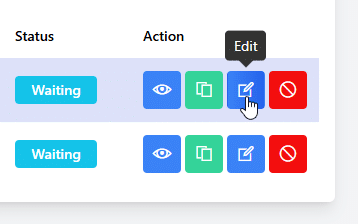
Navigate to the Email Blast section of your Election Manager. Find the scheduled email you want to update. Click the Edit icon in the Action column beside the email.
Update the email body, scheduled date, or send time. Save your changes when you are finished.
Once saved, the revised version will automatically replace the original scheduled message.
Which Email Blasts Can Be Edited?
Only voter email blasts scheduled for a future date and time that have not yet been sent can be edited.
Messages that have already been sent cannot be changed.
More Flexibility for Election Communications
Election timelines and communication needs can change. You may need to correct a detail, update other important information, revise the wording of a reminder, or adjust when a message will be sent to voters.
This update makes managing voter communications easier by allowing you to revise an existing scheduled message directly within the online voting tool in just a few clicks.


 Simply Voting recently completed its 2026 SOC 2 examination with A-LIGN, an established cybersecurity compliance firm that reports having completed more than 36,000 audits for more than 6,400 clients globally. Simply Voting’s examination covered controls relevant to Security, Availability, and Confidentiality for its Online Voting and Internet Elections Services System.